
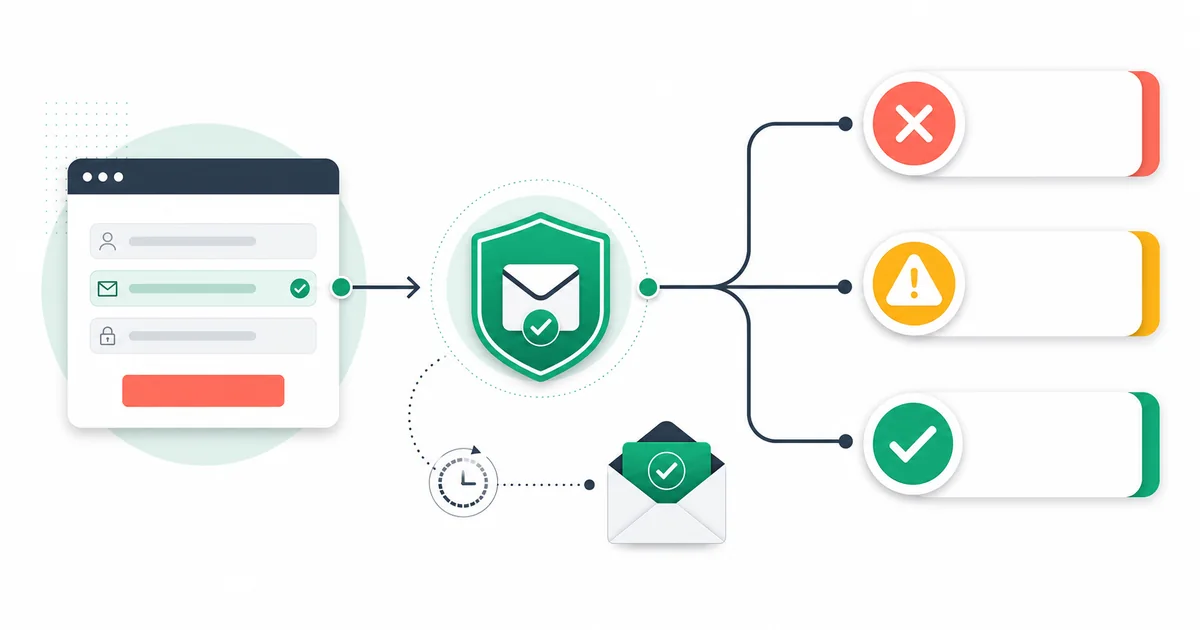
Block a signup only when the address has a clear, correctable failure or the product has a documented eligibility rule. Warn when the evidence indicates a recoverable choice. Accept as pending when verification is temporary, unknown, or too slow for the interaction. This approach protects data quality without presenting an external mail-server problem as a user mistake.
Email verification does not prove account ownership. If access, security, or consent depends on ownership, send a confirmation message and require the user to act on it. Pre-signup validation can improve input and risk decisions, but it is not a substitute for that confirmation.
Separate four layers of the decision
- Input validity: is the submitted string a plausible address?
- Technical evidence: do the domain, MX, provider, risk, and available SMTP signals support use?
- Product eligibility: does the signup permit disposable, role, or personal-provider addresses?
- Ownership and consent: has the person completed the required confirmation and permission flow?
Keep these layers visible in requirements and analytics. A product-specific “work email required” rule should not masquerade as a technical verification failure.
Use a block, warn, or accept decision table
| Evidence | Default UX | Reason |
|---|---|---|
| Malformed syntax | Block and focus the field | The input cannot be used until corrected |
| Conclusive invalid domain or no usable mail route | Block with correction guidance | Strong domain evidence supports a retry with another address |
| Disposable flag | Warn or block according to stated product policy | The mailbox may be temporary, but the rule is business-specific |
| Role flag | Usually accept or warn | A shared inbox can be legitimate |
| Catch-all behavior | Accept as unconfirmed or review | The server does not prove the named mailbox |
| Unknown or temporary response | Accept pending or offer retry | An external failure is not evidence of bad user input |
| Provider-specific ambiguous accept | Accept as unconfirmed | A positive response may not identify a mailbox |
| Verification service unavailable | Follow the explicit fail-open or fail-closed policy | The product must handle dependency failure safely |
Block syntax failures without creating a hostile form
Run basic syntax checks in the browser for fast feedback, then repeat them on the server because client checks can be bypassed. Preserve what the user typed while showing the exact field that needs correction. Avoid overly strict patterns that reject valid but uncommon addresses.
Use a concise message such as “Enter an email address with a name and domain.” Do not announce that a person is invalid. If suggesting a likely domain typo, let the user accept or ignore the suggestion rather than silently rewriting the address.
Handle invalid domains as correctable input
A conclusive domain or MX failure can support a block because the address cannot normally receive mail. Explain that the domain could not be used and invite correction or another address. Keep temporary DNS errors separate so an infrastructure timeout does not become a false invalid message.
The public email checker is useful for manual DNS-level inspection, but an application integration should use authenticated server-side API calls and protect its key.
Make disposable-address policy proportional
A disposable address may work briefly and then disappear. A free trial vulnerable to repeated abuse may choose a hard block. A low-risk newsletter or resource request may warn, accept with limits, or rely on confirmation. State the requirement before submission and provide a route to use a durable address.
Mailthentic exposes disposable classification in the result flags, and it can contribute to an invalid result in the full engine. Do not assume every free provider is disposable. The disposable detection guide explains the distinction.
Treat role addresses as context
Shared inboxes such as support or accounts can be appropriate for business administration. They may be a poor fit when the account must represent one licensed individual. Decide based on the product model, communicate the rule, and do not claim the mailbox is nonexistent merely because flags.is_role is true.
Do not hard-block catch-all and unknown results by default
A catch-all domain accepts arbitrary recipients, so the target mailbox cannot be confirmed from that behavior. An unknown result may follow greylisting, timeout, connection failure, or another temporary condition. Both categories can contain legitimate users.
Accept the signup into a pending or restricted state, request ownership confirmation, or route a high-risk event for review. If the use case genuinely requires a verified work mailbox before access, explain that rule and offer a retry. Read how catch-all evidence should be handled.
Design for an asynchronous API
Mailthentic's single verification endpoint is asynchronous. A server sends JSON containing the email to POST /api/verify/single with a bearer API key. An accepted request deducts one credit and returns HTTP 202 with job_id, status_url, and results_url. The application polls the returned URLs rather than expecting a full result in the first response.
A practical signup flow is:
- Validate basic input on client and server.
- Create a local pending-signup record with an internal idempotency key.
- Submit one verification job from the server. Never expose the API key in browser code.
- Poll within a short interaction budget that your product team has tested.
- If a result arrives, apply the decision table and preserve status, reason, flags, and
created_at. - If the budget expires, continue under the approved pending-state policy and finish polling outside the request.
- Use ownership confirmation when required, independent of the verification result.
The API product page and API playground are the current product destinations. The existing integration tutorial provides introductory examples.
Choose fail-open or fail-closed by consequence
Fail-open means the signup can continue in a controlled state when verification is unavailable. It protects conversion and access but requires later review, confirmation, or limits. Fail-closed means a dependency failure prevents continuation. It can be appropriate for a narrowly defined high-risk action, but it makes the verifier part of the signup availability path.
Many products should fail open for account creation and fail closed only for a later sensitive action. Document the decision by action, not for the entire application. Make sure support can identify a pending verification state without asking the user to resubmit repeatedly.
Handle timeouts and duplicate submission safely
Set a client-visible interaction budget and a separate server request timeout. A browser timeout must not cause the server to create another paid verification job automatically. Reuse the local pending record, poll the known job, and make retries conditional on the error class.
Disable repeated submit activation while the request is being accepted, but do not trap keyboard or assistive-technology users. On refresh, restore the pending state. If the API returns an authentication, permission, or credit error, alert operations and apply the product fallback rather than telling the user their address is invalid.
Write accessible, truthful messages
- Associate the error text with the email field and announce changes through an accessible status region.
- Move focus only when it helps the user correct a blocking field.
- Use text and icons in addition to color.
- Keep the submitted value available for correction.
- Say “we could not check this address right now” for temporary failures.
- Do not expose raw SMTP transcripts or internal security detail to the browser.
- Provide a support or alternate path when policy blocks a legitimate edge case.
Measure decisions after launch
Track syntax corrections, domain corrections, warnings accepted, disposable blocks, pending outcomes, confirmation completion, API error class, timeout rate, support contacts, and later campaign bounces by decision cohort. Do not log full addresses in broad analytics. Use protected application records where case-level investigation is necessary.
Review false-block reports and abandonment around each message. A higher number of blocks is not automatically success. The goal is accurate data and an understandable path for legitimate users.
Keep verification in its proper role
Verification can reduce avoidable input errors and identify uncertainty before it enters the account database. It cannot guarantee delivery, prevent every fake account, prove identity, or replace consent and security controls. Pair it with rate limits, abuse detection, confirmation, authentication, and a documented exception process.
Design against the actual API contract
Open the Mailthentic email verification API, test asynchronous responses, and implement an explicit pending state before enforcing a signup rule.
Ready to verify your email list?
Start free with 250 verification credits. No credit card required.