
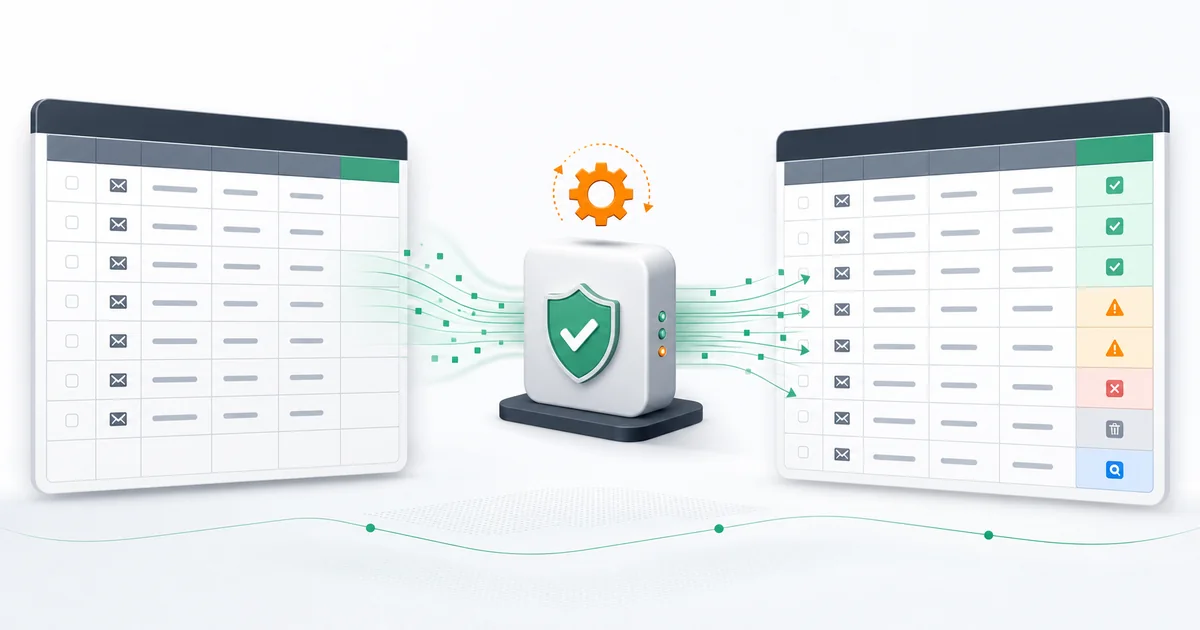
This workflow checks the email in each new Google Sheets row and writes Mailthentic evidence back to that same row. Its three draft steps are Google Sheets New Spreadsheet Row, Mailthentic Verify Email, and Google Sheets Update Spreadsheet Row. No public Mailthentic template URL exists yet.
When this workflow is useful
Use it for a modest stream of signups, event registrations, partner leads, or research records that already arrive in a spreadsheet. For a historical file or a large import, use the bulk email verifier so the job, duplicate handling, and export remain together.
Prepare the spreadsheet
Keep row one as headers and avoid blank rows inside the working range. A practical sheet uses only fields the production result returns:
| Column | Mapped value |
|---|---|
Source address mapped into Email | |
| Mailthentic Status | status |
| Reason | reason |
| Confidence Score | confidence_score |
| MX Found | mx_found |
| MX Provider Type | mx_provider_type |
| Catch All | is_catch_all |
| Disposable | flags.is_disposable |
| Role Based | flags.is_role |
| Result Created At | created_at |
Configure the Zap
- Choose the spreadsheet and worksheet in New Spreadsheet Row. Test with a complete row.
- Add Mailthentic Verify Email. Map the trigger's Email cell into the required
Emailinput. - Run the test and inspect the exact output. Keep unknown and risky results distinct.
- Add Update Spreadsheet Row. Select the same spreadsheet and worksheet.
- Map the Row value from the trigger step, not a row number typed by hand and not a value returned by Mailthentic.
- Map the result fields into the prepared columns and retest the full Zap.
Map the exact result fields
Zapier's tested output should supply the fields below. There is no native risk_level, checked_at, or request_id field, so do not map those names as if Mailthentic returned them.
| Field | Use |
|---|---|
status | Preserve the detailed Mailthentic result, such as an invalid, risky, deliverable, or unknown status. |
reason | Keep the human-readable explanation beside the status. |
confidence_score | Store the evidence score as context, not as a delivery probability. |
syntax_valid, dns_valid, mx_found | Record the input, domain, and mail routing checks. |
mx_provider_type, mx_hosts, mx_used | Retain detected provider and MX routing evidence. |
is_catch_all | Keep catch-all uncertainty visible. |
flags.is_disposable, flags.is_role | Apply separate disposable and shared-role policies. |
smtp_connectable, mailbox_confirmed, smtp_response_code | Store SMTP evidence when the receiving server makes it available. |
created_at | Record when the verification result was created. |
Test the decision paths
Use test records your organization controls. Include a normal address, a deliberately malformed address, and a known disposable-domain address. A catch-all result cannot be forced reliably because it depends on the domain. Confirm that each test updates its original row and that the input email remains unchanged.
A valid-looking status is not a delivery promise. Review the Mailthentic status model before adding Filters or downstream actions.
Avoid duplicate rows and repeated checks
The update action should modify the existing row. Do not use Create Spreadsheet Row for the final step. If another automation watches row changes, add a Verification State column with values such as pending and complete, then trigger only when the email exists and the state is empty. This state is your spreadsheet field, not a Mailthentic output.
Troubleshooting
- The new row is missing: confirm the correct worksheet, keep headers in row one, and retest after adding a complete row.
- The update changes another row: remap the trigger's Row identifier in the final action.
- Fields are missing: rerun Mailthentic's test and expand nested
flagsin the mapping picker. - The Zap loops: trigger only on new rows or gate processing with your Verification State column.
- Nothing runs for old rows: a new-row trigger is not a bulk backfill tool.
Credits and alternatives
Each accepted Mailthentic single verification uses one credit. The workflow may also use Zapier tasks according to your Zapier plan. For application-controlled volume, use the API. For one quick domain-level review, try the free checker.
Start with the reviewed three-step flow
The Google Sheets template is still a draft. Explore the Beta Mailthentic integration and use this field map until a public template URL is available.
Ready to verify your email list?
Start free with 250 verification credits. No credit card required.
Continue in Zapier
The related template is not public yet. Open the Beta integration and build the reviewed workflow from the steps above.
Explore the Mailthentic Zapier integration